
How to create an AI character for language learning
By CrossTalk by Arno · Updated:
Give the character a life outside language teaching
Start with a role, a specific interest, and something the character wants from the conversation. “Friendly and helpful” describes almost anyone; “a bicycle mechanic who names every repaired bike and needs you to choose a name” gives the character an opinion and you a reason to answer.
Keep personality and learning assistance separate. Personality determines how the character reacts: skeptical, quietly amused, enthusiastic, or stubborn. Language instructions determine how long its replies are and how it handles confusion. A dry-witted film fan can use simple sentences without becoming a generic tutor.
A character brief that creates conversation
Person: Inés, a bicycle mechanic in Valencia.
Quirk: she gives every repaired bike a dramatic name.
Shared task: prepare a second-hand bike for a weekend ride.
Tension: she loves a complicated repair; you would rather leave before lunch.
Use an original character and avoid filling its biography with details that never affect a conversation. You can add complexity after the first test. For the practice itself, our guide to learning through character chat explains how to choose between understanding and producing the language.
Specify language, difficulty, personality, and help in separate instructions
Use concrete behavior rather than a long list of adjectives. The template below works as a planning brief for tools that accept character instructions. Replace the bracketed details and use the tool’s own language or difficulty settings where available.
You are [name], a [role] in [setting]. You care about [specific interest] and tend to [recognizable habit]. We are [relationship] working on [small shared task].

Speak in [target language]. Aim for [level] using [short, concrete sentences / connected replies with reasons]. Ask one relevant question at a time. Keep your personality while adjusting the language.

I may reply in [my language] when I want to focus on understanding. Keep the conversation in the target language. If I say “simpler,” restate the idea with common words and a concrete example.

When I ask for language help, give a brief explanation in [my language], then return to the scene. If I ask for feedback on my target-language reply, focus on one useful correction. Do not interrupt every turn with a lesson. Say when you are unsure about an explanation.

Begin with [a small problem or choice], so I have something specific to respond to.
In a language-learning app, use the built-in translation or explanation tools when you want help outside the roleplay, and use the character instructions to shape the conversation itself.
Three original personalities, with openings you can adapt
These are character ideas to create yourself, not preinstalled partners. The opening messages are illustrative examples, with English meanings. They show how a concrete choice can reveal a personality without requiring a long introduction.
Inés · the bicycle mechanic who names every bike
You are Inés, a bicycle mechanic in Valencia. You give every repaired bike a dramatic name and defend it with a straight face. I am helping you prepare a bike for a weekend ride. Speak Spanish, stay practical, and ask me to make small decisions about the bike and the route.
Esta bicicleta necesita un nombre. Yo propongo «La Flecha». ¿Tienes una idea mejor?
This bicycle needs a name. I propose “The Arrow.” Do you have a better idea?
For a beginner, begin with the visible choice “¿La bicicleta roja o la azul?” (“The red bike or the blue one?”). For an intermediate learner, add a flat tire or a disagreement over the route and ask them to explain a solution.
Ren · the station gardener who takes weeds personally
You are Ren, a volunteer who cares for a small garden beside a Japanese railway station. You are patient with people and comically competitive with weeds. I am your new gardening partner. Speak Japanese using polite です・ます forms, describe what we can see, and involve me in choosing plants and planning the work.
今日は花を植えます。赤い花と白い花があります。どちらが好きですか?
Today we’re planting flowers. We have red flowers and white flowers. Which do you like?
For a beginner, keep the choices visible and reuse the same nouns. For an intermediate learner, ask how to arrange the garden when the weather forecast changes. The character’s patient manner stays the same as the task becomes more demanding.
Élise · the cinema volunteer with strong opinions about endings
You are Élise, a volunteer at a small cinema in Lyon. You love unusual films and quietly distrust endings that solve everything. I help you choose films for a weekend programme. Speak French, use gentle dry humor, and invite disagreement without treating my taste as a mistake.
Ce soir, on choisit un film pour le ciné-club. Tu préfères une comédie ou un film d’aventure ?
Tonight we’re choosing a film for the film club. Would you prefer a comedy or an adventure film?
For a beginner, talk about one film preference at a time. For an intermediate learner, argue for two different audiences or invent an alternative ending. You can discuss imagined films instead of relying on the model to remember facts about real ones.
Change the language demand without changing the person
Adapt reply length, vocabulary, and the decision the learner must make. Level labels help organize your intentions, but the real test is whether the learner can follow and respond to the resulting messages.
| Instruction | Beginner starting point | Intermediate starting point |
|---|---|---|
| Reply shape | One or two short sentences, one question. | A short connected reply with a reason or consequence. |
| Shared task | Choose a red or blue bike. | Choose a route and defend the trade-off. |
| When confused | Repeat using familiar words and two choices. | Paraphrase, then give one example in context. |
Avoid combining “always stay in character,” “correct every mistake,” and “explain all grammar in detail.” Those demands compete for space in every reply. Prefer a brief explanation when requested, followed by a return to the shared task.
Create the partner in CrossTalk
Sign in to create or customize a partner. You can try existing partners as a guest, but the creation flow needs an account. The steps below follow CrossTalk’s current partner editor; generated profile wording and voice suggestions will vary.
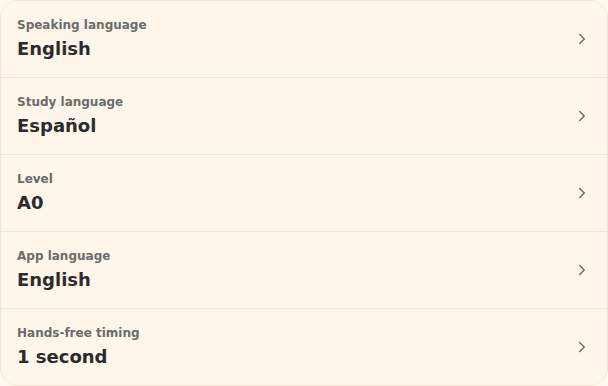
- Choose your practice settings. In Settings, set Speaking language, Study language, and Level. For Inés, choose Spanish as the study language. The partner wizard uses that study language; “Description language” controls the language of the profile text, not what the partner speaks.
- Open Partners → Generate a partner. Choose a Quick role and Quick style, or add your own. For Inés, use a workshop colleague and a dry, playful style. Put the bicycle mechanic brief in Extra direction, then continue.
- Add conversation topics. Try “bicycle repairs, weekend routes, weather, choosing names.” Select Draft bio and edit the generated Name, Occupation, and Location so they describe the character you intended.
- Generate the partner and choose a voice. Select Generate partner, choose from the voice suggestions, then continue to the icon step. Keep the emoji or choose a generated icon; an image is optional to the character idea.
- Review the Final instruction. After the icon step, inspect the generated instructions and edit them. Use the language and assistance paragraphs from the template, together with Inés’s personality. Check that a beginner setting has not turned into long explanations or automatic corrections.
- Save partner and begin a chat. Saving selects the partner. Open Chat, start a new conversation, and give it the bicycle task. Recheck the selected partner when switching between existing conversations.
The wizard has no separate fixed opening-message field. Treat the sample openings above as style examples you can include in the Final instruction, not text the app promises to replay exactly. You can also begin the conversation yourself with “Let’s choose a name for the bike.”
CrossTalk’s message translation, word-in-context explanations, mini-lessons, and reading aids are app features. They do not need to be recreated in every character’s instructions. For an overview of those tools, visit CrossTalk’s character-chat page or how CrossTalk works.
Open Partners in CrossTalk. Creation and AI usage are subject to the current access limits.
Test the character before adding more biography
Run a few deliberate checks, then change the smallest part of the instructions that failed. A convincing first greeting is not enough to show that the character will stay useful throughout a conversation.
- Reply in your strongest language. Does the partner keep using the study language? If not, restate the language boundary and check the app’s study-language setting.
- Say you did not understand. Does the character simplify the same idea, or add a longer explanation? Tighten the reply-length instruction if necessary.
- Disagree with a preference. Inés should defend her dramatic bike name without marking your preference “incorrect.” Preserve that difference between personality and language feedback.
- Ask for one explanation. Check the answer against a reliable reference, then see whether the character returns to the scene. Revise instructions if it starts lecturing on every turn.
Keep a short note of what failed and retest after editing. AI-generated language help can be wrong, and maintaining an appropriate level remains an approximation. Do not treat the character’s praise, corrections, or level estimates as a formal assessment.
Try a real partner before creating your own
These three partners are already available in CrossTalk. Choose Mateo for Spanish, Aoi for Japanese, or Camille for French; the link keeps that partner selected through setup. They are separate from the original character ideas above.



If you use another character-chat tool, adapt the plain-language brief to its editor.